
Data extraction tools compared: from PDFs to web pages
A marketer retypes 40 supplier prices from a catalog only to find there’s a typo in the report when it goes out. An analyst rebuilds the same competitor sheet every Monday. Data extraction is the answer: software reads a file or website, pulls the relevant fields, and turns them into rows. The caveat is that you need a different approach for a scanned invoice, an Excel export, and a product page.
Data extraction for PDFs, office files, and web pages: key insights
- Digital PDFs with a selectable text layer are straightforward to parse. Scanned pages need OCR, and that works best at 300 dpi and above.
- Google Sheets import functions are ideal for static online tables, but they’re not capable of reading content that’s rendered via JavaScript and only update roughly once an hour.
- GDPR applies to scraping whenever personal data ends up in the dataset, even if the original page was entirely public.
What is data extraction, and why do marketers and small businesses need it?
Data extraction is the process of pulling values from a document, spreadsheet, or website and putting them into a structured format. It’s the first stage in any data pipeline, feeding into your CRMs and your dashboards.
Small teams get speed and consistency. A price list that would take you an hour to retype can be imported in seconds. Having a defined template or scraper means that reports can also be generated week in, week out. This is typically how the majority of automated workflows operate within expanding companies.
Structured vs. unstructured data: how the file type affects extraction
Structured data is organized in fixed fields (for example, in CSV or database form), so a filtering and mapping process is used. Unstructured data does not have this organization. Contracts, invoices, and articles mix free text with graphics and/or tables. According to Gartner analysts in May 2026, between 70% and 90% of an organization’s data is unstructured.
Extraction tools by input type: PDFs, office documents, and public websites
In general, data extraction tools sit under one of three headings, and there is a distinct separation between each.
PDFs and scans: PDF parsing for digital files and OCR for paper records
PDFs produced from accounting packages also contain text and so can be analyzed via a PDF parser. Numerical data is highly accurate in this case. Paper contracts require OCR analysis since they are effectively scanned images. Again, a quick way to establish if text is present is to press Ctrl+F (Find). If text is locatable, then there is no requirement for OCR.
- Strengths: parsers work quickly and accurately. OCR allows access to paper and photographic data
- Limitations: poor quality or noisy paper scans can lead to inaccuracies. Table headers can also become misaligned
- Typical use cases: invoices, bank details, supplier information, signed paperwork
Documents and spreadsheets: built-in importers, templates, and converters
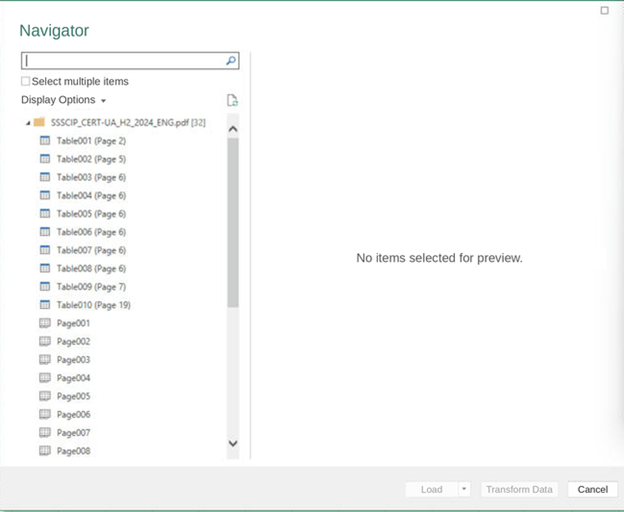
As Word, Excel, and CSV files already have defined structures, these are amongst the simplest data sources. Within Microsoft 365 (Windows version), Excel includes a PDF connector in its Power Query function, which is able to extract tables from electronic PDFs. Template parsers map a defined format (such as an order acknowledgment sent weekly) to defined data points.
- Strengths: no programming knowledge is needed, solutions are inexpensive, and outputs go straight into spreadsheets
- Limitations: templates fail if the source of data changes its format. Furthermore, importers cannot analyze graphical information
- Typical use cases: sales analysis, order acknowledgments, survey outputs, pricing information
Public web pages: formulas, no-code scraper apps, and stable connections
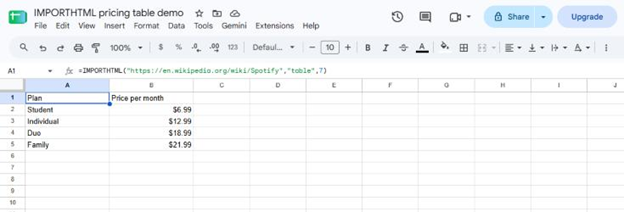
Within Google Sheets, the IMPORTHTML and IMPORTXML functions can be used. Google mentions that whilst a file is open, these import functions refresh data hourly. No-code scrapers enable users to click on desired information and also include built-in scheduling. Code-based parsers can analyze much bigger or more unique websites.
- Strengths: up-to-date information regarding pricing, comments, and stock
- Limitations: JavaScript-rendered content, frequent site redesigns, restrictions around the number of times data can be requested.
- Typical use cases: price comparison with rival companies, watching supplier information, conducting Amazon market research.
During a scraper run, teams often use proxies to consistently extract public website data. In the early stages, staff first check and set up the connection with free proxy tools before implementing any projects.
Data extraction tool groups compared by input, skill level, and limits
| Tool group | Best input | Skill level | Main strength | Main limitation |
|---|---|---|---|---|
| PDF parsers | Digital PDFs | Low | Exact numbers, fast batches | Fail on scans |
| OCR engines | Scans, photos | Low to medium | Unlock paper archives | Weak on poor scans and tables |
| Importers and templates | Excel, CSV, Word | Low | Results land in sheets | Break when layouts change |
| Sheets formulas | Static HTML tables | Low | Free, no setup | No JavaScript, hourly refresh |
| No-code scrapers | Multi-page sites | Low to medium | Pagination, scheduling | Paid tiers, redesigns |
| Code-based parsers | Complex sites, APIs | High | Full control and scale | Developer time and upkeep |
How to choose the right extraction tool for a specific business task
- What type of data? Check whether a text-based layer is present before paying for OCR.
- Can you extract it via an official method? If you can download in CSV format, it is far more reliable than scraping.
- How much data? If you are only extracting data once, you can do this with formulas. If you have 5,000 rows every week, consider scheduling it.
- Test 20-50 files across different tools to understand how many issues arise to decide whether to pay for a service.
Legal considerations for collecting public data: GDPR and website policies
As 53% of online traffic was made up of bots in 2025 (Imperva, 2026 Bad Bot Report), site owners are aware of large volumes of automated requests. There are three main rules to follow when extracting data:
- Open pages only. Do not extract data from behind login pages, paywalls, or personal accounts.
- Personal data is governed. The EDPB’s July 2026 draft guidelines on web scraping confirm that if you extract personal data via scraping, GDPR regulations apply. Avoid extracting personal data like names and contacts.
- Website policies come first. When extracting data, teams must consider the ToS and robots.txt file and make requests at reasonable volumes.
Which extraction setup is best for a small marketing or analytics team?
Choose a data extraction setup based on your needs. You can extract digital documents using Power Query or PDF parsers. Paper data should be run through an OCR engine. A few static web tables can be extracted using formulas in sheets. Finally, if you need to complete the same multi-page extraction regularly each week, you would get value out of a no-code scraper.
Frequently asked questions on extraction methods, accuracy, and legality
Below are answers to the most common questions marketers and analysts have.
Is data extraction the same as web scraping?
No. Data extraction refers to extracting data from any source (PDFs, scans, emails, databases, etc.). Web scraping is a type of data extraction, but only from websites. If a team is converting supplier bills into spreadsheets, this is data extraction but not web scraping. A team that’s monitoring competitor prices is doing data extraction via scraping. In most business scenarios, you’ll end up combining both approaches at some point.
Can data extraction run on autopilot without coding skills?
Yes, for the vast majority of standard tasks. You can refresh a PDF or CSV import with a single click via Power Query. Sheets formulas update automatically, and no-code scrapers can run on a schedule. You only need to write code for very heavy JavaScript sites, very unusual page layouts, or for millions of records.
How accurate is OCR on scanned business documents?
A clean, straight scan at 300 dpi or above will generally give you a good result, whereas a phone photo, a faded receipt, or a crooked page is likely to be problematic. Handwriting is always going to be a weak area for the classic engines. A sensible thing to do is validation (totals should match the line items), and you should always have someone doing a spot check on every batch.
Do website terms of service matter if the data is public?
Yes. Public visibility in no way negates contractual or IP rules. The terms of service may well prohibit automated access. In the EU, the sui generis database right can protect a database even if individual items are public information. The safe route is to gather the facts (prices, availability, etc.) and not to republish any protected content.