
What Is an SSL Certificate Chain? The Ultimate Guide to Getting It Right
Your browser just flashed a security warning. Your stomach drops. You have no idea why your site suddenly looks untrustworthy. If you have ever asked yourself what an SSL certificate chain is and why it matters so much, you are far from alone.
I have spent years helping website owners fix broken certificate setups. The same confusion shows up again and again. People install an SSL certificate, assume the job is done, and never think about the chain behind it. Then a browser warning appears out of nowhere and panic sets in.
This guide breaks down exactly what is an SSL certificate chain, why it exists, and how to make sure yours never fails you. We will cover the real problems site owners face, practical fixes, and mistakes that trip up even experienced developers.
Why Understanding What Is an SSL Certificate Chain Matters So Much
Every secure website depends on trust. When a visitor lands on your site, their browser needs proof that your certificate is legitimate. That proof comes from a structured path of verification. This path is what is an SSL certificate chain in practical terms.
According to DigiCert’s certificate documentation, a properly configured chain links your website’s certificate back to a trusted root authority through one or more intermediate certificates. Without that unbroken link, browsers cannot confirm your site is safe. They throw up warnings instead.
Google reported that Chrome now flags any site without a fully valid HTTPS setup as “Not Secure” in the address bar. That single warning can tank conversion rates fast. Shoppers abandon carts. Visitors bounce within seconds. Trust evaporates instantly.
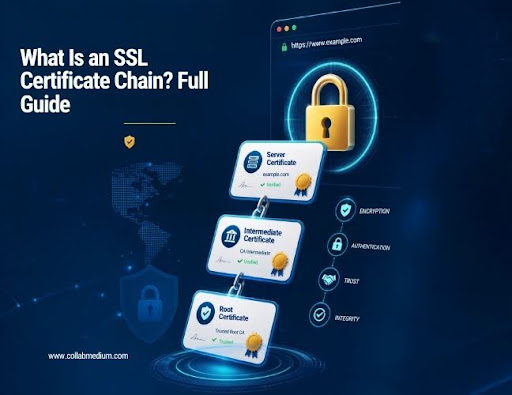
The Three Pieces That Make Up an SSL Certificate Chain
Root certificate: This sits at the very top. Certificate authorities guard root certificates carefully because everything else depends on them.
Intermediate certificate: This bridges the gap between your website certificate and the root. Most modern setups use at least one intermediate certificate.
Leaf certificate: This is your actual website certificate. It identifies your specific domain and gets issued directly to you.
Understanding what an SSL certificate chain is starts with recognizing how these three pieces connect. Each link verifies the one below it, creating a chain of trust.
The Core Problem: Why SSL Chains Break So Often
Here is the mistake I see constantly. A site owner installs their certificate, sees the padlock icon appear in their own browser, and assumes everything works. But their own browser already trusts the intermediate certificate from a previous visit. New visitors do not get that same shortcut.
This is the exact moment people start googling what is an SSL certificate chain in a panic. Their site looks fine to them but broken to everyone else. That mismatch causes real damage before anyone notices.
The average website loses meaningful traffic within hours of a broken chain going live. Search engines can also flag inconsistent certificate setups, which hurts rankings over time. That is not a small issue for any business relying on organic traffic.
How Broken Chains Actually Happen
Most chain failures come from incomplete installation. A developer uploads only the leaf certificate and skips the intermediate certificate entirely. The server never sends the full path, so unfamiliar browsers cannot verify anything.
Expired intermediate certificates cause similar chaos. Certificate authorities occasionally rotate their intermediates. If your server still references an old one, your chain silently breaks even though nothing changed on your end.
Misconfigured servers are another frequent culprit. Apache, Nginx, and IIS all handle certificate bundles differently. A setup that works perfectly on one server type can fail completely on another if the bundle order is wrong.
Practical Solutions: How to Fix and Verify Your SSL Certificate Chain
Once you understand what an SSL certificate chain is, fixing it becomes far less intimidating. Start by testing your current setup rather than guessing.
Use a dedicated SSL checker tool to scan your domain. These tools show you exactly which certificates your server presents and flag any missing intermediates immediately. This single step catches the vast majority of chain problems.
Next, confirm your certificate bundle includes every required file. Most certificate authorities provide a bundle file specifically built to solve what is an SSL certificate chain gap. Installing that bundle in the correct order matters enormously.
Restart your web server after any certificate change. Cached configurations sometimes mask real problems until a fresh restart forces the server to reload the full chain.
Tools and Platforms That Simplify Certificate Chain Management
SSL Labs by Qualys offers a free, detailed scan of your entire certificate setup. It grades your configuration and highlights chain issues clearly.
Let’s Encrypt automates much of what is an SSL certificate chain complexity through free, auto-renewing certificates. Their ACME protocol handles intermediate bundling automatically for most common server setups.
Cloudflare manages certificate chains on your behalf when you route traffic through their network. This removes a significant amount of manual configuration work.
DigiCert and Sectigo remain popular for businesses that want extended validation and dedicated support when chain issues arise unexpectedly.
Common Mistakes to Avoid With SSL Certificate Chains
Site owners repeat the same errors when they first learn what an SSL certificate chain actually requires. Avoiding these mistakes saves hours of troubleshooting later.
Mistake 1: Installing only the leaf certificate. This is by far the most frequent error. The site works locally but fails for a meaningful portion of visitors using different browsers or devices.
Mistake 2: Ignoring certificate expiration dates. Root and intermediate certificates expire too, not just your leaf certificate. Set calendar reminders well before any expiration date arrives.
Mistake 3: Mixing certificate types across subdomains. Wildcard and standard certificates sometimes create inconsistent chains if mismanaged across a multi-subdomain setup.
Mistake 4: Skipping verification after renewal. Many site owners renew certificates automatically but never confirm the new chain deployed correctly. Silent failures slip through here often.
Mistake 5: Forgetting mobile browser testing. Older mobile browsers sometimes lack newer root certificates preinstalled. Testing across multiple devices catches this gap early.
Pro Tips From Years of Fixing Broken Certificate Chains
Tip 1: Always test from an external tool, never your own browser. Your browser already trusts pieces of your chain from prior visits. External SSL checkers see your site the way a brand-new visitor does.
Tip 2: Keep a written record of every certificate authority you use. Switching providers years later without documentation creates confusion when someone needs to explain what is an SSL certificate chain to a new team member.
Tip 3: Automate renewals wherever possible. Manual renewal is where most chain failures originate. Tools like Let’s Encrypt reduce human error dramatically through automatic renewal cycles.
Tip 4: Monitor your certificate chain continuously, not just at installation. Uptime monitoring services can alert you the moment a chain breaks, often before customers notice anything wrong.
Tip 5: Understand your hosting provider’s role. Some hosts manage certificate chains entirely on your behalf. Others require you to handle every step manually. Know which situation applies to your setup before an emergency hits.
Why Certificate Chains Matter for SEO and Trust
Search engines increasingly weigh site security as a ranking signal. A broken SSL certificate chain setup does more than scare visitors away. It can quietly hurt your visibility in search results over time.
E-commerce sites feel this pain acutely. Shoppers abandon checkout pages the instant a browser warning appears. That single moment of doubt costs real revenue, often without the site owner ever realizing why conversions dropped.
Trust signals compound across an entire site. A fully valid chain reassures visitors on every single page, not just the homepage. That consistency builds confidence over an entire browsing session.
SSL Certificate Chain Comparison: Common Providers and Features
| Provider | Cost | Auto-Renewal | Chain Management | Best For |
| Let’s Encrypt | Free | Yes | Automated | Small sites and startups |
| DigiCert | Paid | Optional | Manual or managed | Enterprise businesses |
| Sectigo | Paid | Optional | Manual or managed | Mid-size businesses |
| Cloudflare SSL | Free or Paid | Yes | Fully managed | Sites behind Cloudflare |
| GoDaddy SSL | Paid | Optional | Manual | Small business owners |
Pricing and features change frequently. Always verify current details directly with each provider.
Choosing the right provider depends heavily on your technical comfort level. Beginners often benefit from fully managed options. Experienced developers may prefer manual control for flexibility.
For more related articles , please visit : www.collabmedium.com
Frequently Asked Questions
What is an SSL certificate chain?
An SSL certificate chain is the linked path connecting your website’s certificate to a trusted root authority. It includes your leaf certificate, one or more intermediate certificates, and the root certificate itself.
Why does my SSL certificate chain show as broken?
Your chain usually breaks because the server is missing the intermediate certificate file. Reinstalling the full certificate bundle in the correct order typically resolves this issue quickly.
How do I check my SSL certificate chain for free?
SSL Labs by Qualys offers a free tool that scans your domain and reports any chain issues instantly. It also grades your overall configuration for easy reference.
Does a broken SSL certificate chain affect SEO?
Yes, search engines treat site security as a ranking factor. A broken chain can reduce visitor trust and indirectly hurt your search visibility over time.